

How to Use Google More Effectively: Simple Search Tricks Most People Don’t Know
Most people use Google every single day.
And most people are terrible at using it.
That’s not an insult — it’s just reality.
They type a few words, skim the first results, click randomly, and repeat the process when they don’t find what they need. Over time, this wastes hours, creates frustration, and makes simple tasks feel harder than they should.
The truth is, Google is an incredibly powerful tool — if you know how to speak its language.
This guide will show you a few simple, practical search tricks that dramatically improve your results, help you find answers faster, and make the internet work for you instead of against you.
No technical knowledge required.
Why Most People Struggle to Find What They’re Looking For
Google isn’t the problem.
The problem is how we search.
Most people:
Use vague phrases
Add unnecessary words
Scroll endlessly instead of refining
Don’t know they can control results
Google responds to how you ask — not just what you ask.
Once you learn a few basic operators, your searches become:
More precise
More relevant
Much faster
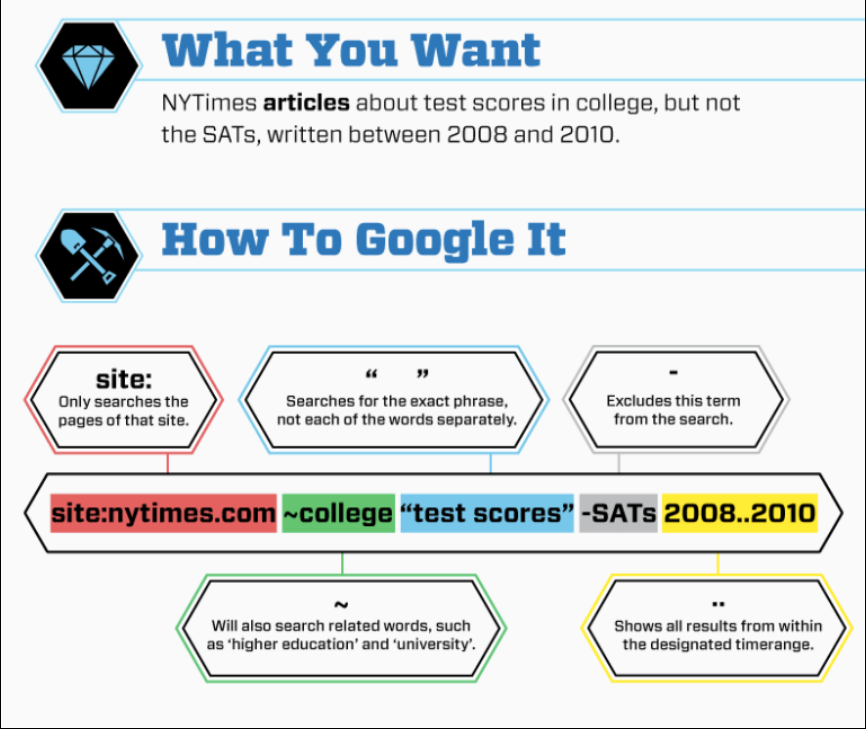
Trick #1: Use Quotation Marks to Search Exact Phrases
Quotation marks tell Google:
“Only show results with these exact words, in this exact order.”
Example:
"simple digital filing system"
Without quotes, Google:
Mixes words
Rearranges meaning
Shows loosely related pages
With quotes, Google:
Finds exact matches
Eliminates noise
Improves accuracy
When to use quotation marks:
Searching for a specific phrase
Looking up an error message
Finding a quote or sentence
Researching a specific concept
This alone can save a huge amount of time.
Trick #2: Use site: to Search Within a Specific Website
The site: operator is one of the most underused — and most powerful — tools.
It tells Google to search only one website.
Example:
site:genifiai.com AI prompts
This searches only Genifi AI for pages that mention “AI prompts”.
Why this is useful:
Find old blog posts quickly
Search large sites without using their internal search
Research competitors
Find documentation or guides
You can use this on:
Blogs
News sites
Forums
Government websites
Educational resources
Once you start using site:, you’ll wonder how you ever searched without it.
Trick #3: Use the Minus (–) Operator to Remove Results You Don’t Want
Sometimes Google shows results that almost match — but not quite.
The minus sign tells Google:
“Show me results without this word.”
Example:
AI tools -enterprise
This removes results related to enterprise-level tools.
Other examples:
side hustle ideas -crypto
email marketing -spam
This is especially useful when:
A topic has a lot of hype
Certain results keep repeating
You want beginner-friendly content
Filtering out unwanted noise improves focus immediately.
Trick #4: Use Time Filters to Find Recent (or Older) Information
Not all information ages well.
Google allows you to filter results by time.
How to use time filters:
Run your search
Click Tools
Choose:
Past hour
Past 24 hours
Past week
Past month
Past year
Custom range
Why this matters:
AI and tech change quickly
Old advice can be outdated
Recent examples are more relevant
For fast-moving topics, time filtering is essential.
Combine Tricks for Powerful Searches
The real magic happens when you combine operators.
Example:
site:genifiai.com "AI for beginners" -advanced
This tells Google:
Search only Genifi AI
Look for an exact phrase
Exclude advanced content
You’re no longer guessing — you’re directing.
Why Better Searching Matters More Than You Think
Searching isn’t just about finding answers.
It affects:
How fast you learn
How confident you feel
How much time you waste
How overwhelmed you get
When searching feels hard, people give up.
When searching feels easy, momentum builds.
This matters even more if you’re:
Learning new skills
Running a business
Exploring AI tools
Researching ways to grow income
Trying to make smarter decisions online
Common Searching Mistakes to Avoid
❌ Using full sentences instead of key phrases
❌ Skimming instead of refining searches
❌ Clicking endlessly instead of adjusting terms
❌ Assuming Google “just knows” what you mean
Google is powerful — but it still needs direction.
Start Small: One Habit That Changes Everything
The next time you search:
Pause for two seconds
Ask: “How can I be more specific?”
Use one operator
That small shift improves results immediately.
You don’t need to memorize everything.
Just knowing these tools exist changes how you search forever.
Final Thoughts
Most people don’t realize how much time they lose to poor searching habits.
Learning a few simple Google tricks:
Saves time
Reduces frustration
Improves learning
Increases confidence
And once you experience better search results, you start approaching the internet differently — with clarity instead of overwhelm.
This isn’t about being “techy”.
It’s about working smarter with the tools you already use every day.